Cute Doodle Elements: A Playful Dingbats Font for Creative Projects
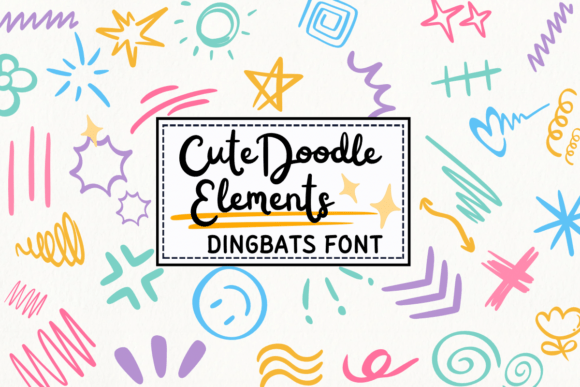
When a project calls for more than just words, a specialized creative asset can make all the difference. Cute Doodle Elements is a dingbats font that steps into this role with a distinct, hand-drawn personality. Unlike a standard serif font or a clean sans serif font, this typeface doesn't contain letters or numbers. Instead, it provides a library of whimsical, sketch-style illustrations accessible directly from your keyboard. Each character you type transforms into a unique doodle, from florals and frames to arrows and abstract shapes, offering an instant toolkit for visual embellishment.
Understanding the Sketch-Style Aesthetic
The core appeal of Cute Doodle Elements lies in its visual character. The illustrations are rendered with a light, imperfect line quality that mimics pen or pencil sketches. This style avoids the sterile, overly polished look of some digital assets, instead embracing a handmade, approachable feel. The personality is decidedly cheerful, informal, and youthful, making it an excellent choice for projects aiming to convey warmth, creativity, and authenticity. It’s a premium font that functions as a versatile design asset, providing visual vocabulary without the need for complex illustration software.
This dingbats font works exceptionally well when paired intentionally. Consider using it alongside a handwritten font for a cohesive, crafty look, or let it provide contrast to a clean, modern sans serif font in web design or editorial design. The key is to allow the doodles to complement, not compete with, your primary typography. They act as decorative accents that can break up text, highlight key points, or add a burst of personality to a layout.
Practical Applications Across Creative Fields
The utility of a creative font like Cute Doodle Elements spans numerous industries and project types. For designers and small business owners, it can become a staple in the brand identity toolkit. Here’s where it shines:
- Wedding Invitations & Stationery: Add delicate floral doodles to borders, use heart symbols as bullet points for event details, or incorporate whimsical arrows to guide the eye. It elevates DIY projects with a professional, custom touch.
- Logo Design & Branding: While not suitable for the primary logotype, these elements can enhance brand collateral. Use a consistent doodle from the font across social media graphics, packaging stickers, or thank-you cards to build visual recognition.
- Packaging Design & Crafts: On product labels or artisan packaging, sketch-style icons can communicate handcrafted quality. They’re perfect for highlighting "organic," "new," or "bestseller" attributes without a generic clip-art look.
- Digital Content & Marketing: Bloggers and content creators can use the doodles as decorative elements in newsletter headers, as unique bullet points in articles, or as engaging icons in social media graphics. They add visual interest that can increase audience engagement.
- Editorial & Publishing: In magazines, booklets, or children’s books, these elements can serve as decorative drop caps, section dividers, or margin illustrations that enhance the reading experience without overwhelming the text.
Integrating Cute Doodle Elements into Your Workflow
Adopting any new typeface requires thoughtful evaluation. For Cute Doodle Elements, start by assessing your project’s tone. Is it playful, casual, or artistic? If the answer is yes, it’s likely a strong fit. If the project demands extreme formality or corporate austerity, a different display font or asset would be more appropriate.
Testing is crucial. Install the font and open a character map to explore its full glyph set. Map the available doodles to your project needs—do you need enough variety for your intended use? Next, consider font pairing. Place a paragraph of your chosen body text next to a line of doodles. Does the scale feel balanced? Does the sketch style clash or harmonize with your main serif font or script font?
Readability, in the traditional sense, isn’t a concern since it’s a dingbats font. However, visual hierarchy is. Use the doodles sparingly as accents, not as a replacement for body text. Overuse can clutter a design and dilute its impact. For commercial projects, always verify the licensing. Ensure the font’s license covers your intended use, whether for digital products, physical merchandise, or client work, to avoid future legal issues.
Ultimately, Cute Doodle Elements is less about typography theory and more about practical creative enhancement. It’s a tool for adding personality, drawing the eye, and infusing a project with a specific, handmade charm. By understanding its strengths and applying it with intention, you can transform standard layouts into engaging, memorable designs that resonate with your audience.